


Piggy Bank Allowance - Bomad
4.446.00 Reviews
App Specs
- Version
- 2.0.266
- Updated On
- License
- Free
- Downloads
- 50,000+
- Developer
- Graeme P
- Categories
- Parenting
- Platform
- Android
Screenshots


 Analysis by AppCompare
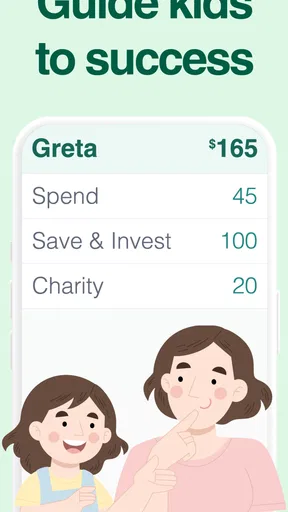
I like the idea of giving children a visible, manageable way to practise handling pocket money, and that is where Piggy Bank Allowance - Bomad makes sense to me. It is a parenting app built around tracking an allowance and dividing virtual money into saving and spending pots. Rather than treating every small purchase as a lecture, a parent can use those separate balances to make choices easier to talk through: what is available now, what is being kept for later, and why those two amounts are different.
The app is free to download, with optional in-app purchases ranging from $1.99 to $29.99 per item. It is rated for Everyone, and Graeme P is the developer. Its average rating is 4.4 from 549 ratings, with 10K+ installs. I would treat those figures as context rather than a promise that it will suit every family; the real question is whether a virtual record fits the way you want to teach and manage allowance.
A simple routine works better than constant bookkeeping
My strongest recommendation is to decide on a small routine before adding lots of categories or rules. For example, agree on when allowance is recorded, which pot is for everyday spending, and what counts as a savings goal. A child can then check the balance before asking to buy something, while a parent can use the same moment to discuss trade-offs. The app is most useful when it supports that conversation, not when it is expected to replace it.
A realistic week might look like this: a child receives pocket money, sees some of it set aside for a larger purchase, and keeps the rest available for small treats. When they are tempted by something inexpensive, you can ask whether they would rather spend from the available amount or keep building toward the goal. That makes the virtual pots a practical teaching aid, even though the app itself does not move physical cash.
What the virtual pots can—and cannot—teach
The separation between saving and spending is a useful starting point because it turns an abstract idea into a visible choice. It can help a child notice that money assigned to one purpose is not automatically available for another. I would keep the first setup uncomplicated, then add detail only if your child is ready to make use of it. Too many rules can make allowance feel like paperwork instead of practice.
There is also an important distinction to explain: a balance inside a virtual allowance tracker is a record, not cash sitting in a child’s hand. If you use real money too, decide as a family how the digital totals correspond to it. You might update the app when allowance is actually handed over, rather than treating an entry as proof that a transfer has happened. That simple habit avoids confusion and makes the tracker more trustworthy.
Who is likely to get the most from it
I see the best fit for parents who want a lightweight way to make allowance more deliberate, and for children who enjoy seeing money separated into clear purposes. It can also help adults who want a basic personal spending-and-saving record, though its family-friendly framing is the more natural match. If you prefer teaching with coins, envelopes, or a notebook, those approaches may be more tangible and may work better for a child who learns by physically handling money.
Worth Reading Before You Choose

EA SPORTS FC Mobile 26 Is a Bigger Football Game, but It Takes Time

Flipboard Shows What News Apps Must Do Beyond the Feed

Switching to Android Auto Means Rethinking Your Driving Routine

Google Calendar Makes a Crowded Week Easier to Manage

Ludo King Makes the Most of the Minutes Between Plans

Baby Panda World Brings Quick Play to Modern Phones, but Its Game Library Feels Busy
It is less suitable if you need a full household budget, shared financial accounts, or automatic handling of real transactions. A virtual tracker is not a substitute for those tools. Nor is it ideal for a family that does not want to maintain a separate record: if nobody updates the balance after allowance or spending, the figures can quickly stop reflecting reality. The app’s value depends on a routine the family can actually sustain.
Small habits that keep the record useful
I would choose one consistent moment to review the pots, such as when allowance is handed out or during a brief weekly check-in. Keep the child involved in recording what has changed, and ask them to explain why they are saving or spending. This is more informative than simply correcting a balance after the fact: it shows whether the categories make sense to them and whether the goal still matters.
Another useful approach is to make a goal concrete before assigning money to it. Talk about what the child wants, how much they are willing to set aside, and what they might give up in the meantime. The app can make progress easier to see, but it cannot decide whether a goal is realistic or help settle disagreements about what parents should pay for. Those decisions still need a clear family rule.
First Impressions
When I first opened Piggy Bank Allowance - Bomad, I was greeted by a super friendly interface. The colors are bright and inviting, which makes managing money feel less like a chore and more like a game. The setup was a breeze—just a few taps and I was all set to start saving.
Features That Stand Out
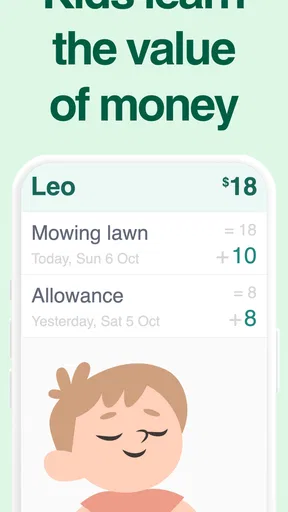
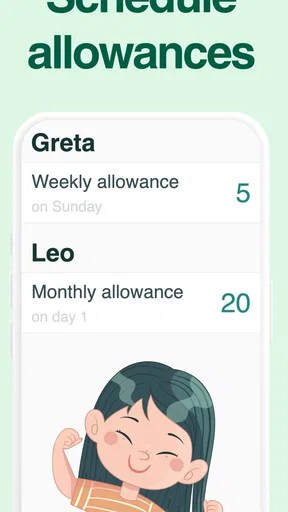
One of the coolest features is the allowance tracker. You can set up regular deposits into your digital piggy bank, much like you would in real life. It’s perfect for kids and adults alike who want to keep track of their spending money. I found this feature really handy because it gave me a clear picture of my finances at a glance.
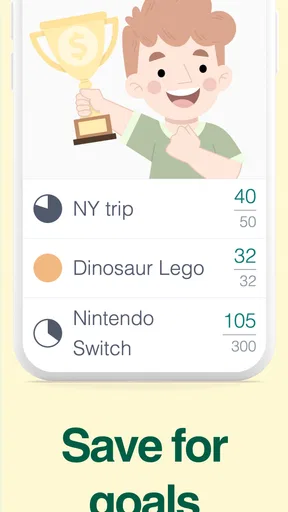
Another neat feature is the goal setting. You can create savings goals for anything from a new gadget to a dream vacation. The app lets you allocate funds toward each goal, and there's a satisfying progress bar that shows how close you are to achieving it. I set a goal for a weekend getaway, and watching the bar fill up was surprisingly motivating!
User Experience
Navigating through the app is pretty intuitive. The developers have done a great job keeping things simple, which is crucial for an app that’s meant to help you manage money. You won’t find yourself lost in a maze of menus here. Everything is right where you expect it to be, and there are helpful tips along the way if you get stuck.
One thing I really appreciated was the app’s notifications. They’re not too intrusive, but they do a good job of reminding you about your goals and any upcoming allowances. I found this really useful, especially when I was busy and needed a gentle nudge to stay on track.
Is It Worth It?
So, the big question: Is Piggy Bank Allowance - Bomad worth downloading? In my opinion, absolutely. It’s a fantastic tool for anyone looking to manage their finances in a fun and engaging way. Whether you’re saving for something big or just trying to keep better track of your daily expenses, this app has got you covered.
It’s especially great for families who want to teach kids about money management. The app’s playful design and easy-to-use features make it a perfect learning tool. Plus, there’s something really satisfying about seeing your virtual savings grow, just like the real thing.
Settings, pacing, and a realistic fit
Before relying on reminders, I would check which notifications are enabled and decide whether they suit your household. A nudge can help a busy parent remember a regular allowance, but repeated prompts are not a substitute for agreeing on when money is given. If alerts feel distracting, a fixed family check-in may be a calmer alternative. The point is to make the routine predictable, not to let a phone notification become the authority on whether a child has earned or received money.
The app is currently at version 2.0.266 and requires Android 9 or later. That is useful to check before installing on an older device, especially if the phone or tablet is shared with a child. The simple setup I found is a strength for families who want to get started quickly, but simplicity also means it should not be mistaken for a comprehensive family-finance system. I would keep any real-world records you already rely on if they serve a different purpose.
Faster patterns without overcomplicating allowance
Once the family has agreed on its rules, consistency is a better shortcut than adding lots of extra tracking. Record allowance at the same time each week, and review spending when it happens or at a regular check-in. This reduces the chance of trying to reconstruct several small changes later. For a child, it also connects the balance to an event they remember: receiving money, choosing a purchase, or deciding to leave funds untouched.
Parents can make the system easier to follow by using plain labels and a small number of purposes. If every purchase needs a new category, the record becomes harder to maintain and less useful for a young child. A spending pot and one meaningful savings goal are often enough to start a conversation. Add complexity only when the child asks for it or can explain how the extra distinction helps them decide.
One trade-off is that visible progress can motivate a child but can also make the target feel like a promise. I would be clear that a goal is a plan, not a guarantee: allowance may change, a purchase may no longer matter, or the family may decide that an item is a parent’s responsibility. Discussing those exceptions openly keeps the app from turning a flexible learning exercise into a dispute over a bar or balance.
Where a different method may be better
Compared with cash in jars or envelopes, a digital tracker is easier to consult without carrying coins, and its goal display can make gradual saving feel tangible. Physical cash has the opposite advantage: a child can count it, hand it over, and see that spending reduces what remains. For younger children who benefit from handling objects, or for families who want a screen-free routine, a real piggy bank may teach the idea more directly.
A notebook can be a better fit when a family wants to write down the reason for each choice and reflect on it together. A full budgeting tool is more appropriate when the goal is to follow household bills or actual transactions. This app occupies a narrower middle ground: it gives allowance and saving a clear structure without replacing either a bank account or a parent’s judgement. That focus is helpful, provided you choose it for the job it is meant to do.
Limits to keep in mind before settling into it
The main limitation is not a complicated feature gap so much as the need for accurate, shared habits. If a child spends real cash but nobody updates the virtual record, the displayed amount can become misleading. If parents disagree about whether allowance is tied to chores, gifts, or a regular schedule, the app cannot resolve that policy question. Agree on those basics first; otherwise, every mismatch risks becoming an argument about the app rather than a useful money lesson.
There is also a difference between tracking an allowance and giving a child independent control of money. The app can help make decisions visible, but parents still need to decide what purchases are appropriate and how actual money is stored or handed over. I would not use a virtual balance as the only safeguard for a child’s spending, and I would not assume it automatically connects to real funds. It is a teaching aid, not a payment method.
Optional purchases are another practical consideration. The app is free to start, but in-app items range from $1.99 to $29.99 each. I would look at the purchase choices with a parent before a child uses the app unsupervised, and keep the basic family routine independent of buying extras. That way, the learning value does not become tied to a purchase decision.
A more useful way to judge progress
I would measure success less by how often the app is opened and more by whether the child begins to make a considered choice. Can they tell the difference between money set aside and money available now? Can they explain why they are saving, or change their mind without treating that as failure? Those are better signs that the routine is working than a perfectly maintained record.
For a parent, a short review can reveal whether the allowance amount, timing, and goal are still sensible. If the child never checks the pots, simplify the arrangement or return to cash. If they enjoy planning but forget to record changes, keep the app as a shared weekly summary rather than demanding real-time updates. Adapting the method to the child is more valuable than insisting that every family use a tracker in the same way.
Final Thoughts
Overall, Piggy Bank Allowance - Bomad is a delightful app that brings a fresh perspective to saving money. It combines practicality with a touch of fun, making it easier than ever to stay on top of your finances. If you’re looking for a new way to manage your money, give it a try—you might just find that saving can be fun!
My recommendation is strongest for a family that wants a friendly visual aid for pocket money and is willing to keep its entries in step with real-life decisions. The app’s allowance tracking, separate pots, and savings goals give parents useful prompts for conversations, while the approachable design can help children take part rather than leave all the bookkeeping to an adult. I would start with one routine and one goal, then let the child’s understanding guide what comes next.
If you need automatic transaction management, a shared household budget, or a completely hands-off record, I would choose another kind of tool. If your aim is to make allowance more visible and turn saving into a regular conversation, this is a sensible option to try. Its best feature is not replacing a parent’s judgement; it is giving that judgement a simple, repeatable place to meet a child’s choices.
Pros
- User-friendly interface for easy navigation.
- Customizable savings goals for kids.
- Interactive educational tools included.
- Parental controls ensure safety.
- Real-time updates on progress.
Cons
- Limited to specific banking partners.
- No offline mode available.
- Ads can be distracting for users.
- Requires parental setup initially.
- In-app purchases may add costs.
FAQs for Piggy Bank Allowance - Bomad
What is Piggy Bank Allowance - Bomad?
Piggy Bank Allowance - Bomad is a financial management app designed to help users track and manage allowances and savings. It’s particularly useful for teaching children about money management by allowing them to set savings goals, track their progress, and understand the value of saving money over time.
How secure is the Piggy Bank Allowance app?
The app prioritizes user security by implementing robust encryption methods to protect personal and financial data. It does not require sensitive banking information, which minimizes risk. Regular updates ensure that the app remains secure against potential vulnerabilities, providing peace of mind for users.
Can multiple users manage separate accounts on one device?
Yes, Piggy Bank Allowance - Bomad supports multiple user profiles on a single device. This feature is ideal for families, allowing each member to manage their own savings goals and track allowances independently. Each profile can be customized with unique settings and preferences.
Is Piggy Bank Allowance suitable for all age groups?
While Piggy Bank Allowance is designed with children in mind to help them learn about saving and spending wisely, it is also suitable for adults. The straightforward interface and customizable features make it a versatile tool for anyone looking to improve their financial habits.
Does the app require an internet connection to function?
Piggy Bank Allowance - Bomad can be used offline, allowing users to manage their savings and track allowances without an internet connection. However, an internet connection is necessary for features like cloud backup and synchronization across multiple devices to ensure data is secure and up-to-date.


